
Your day,
around the Sun.
Open Today and see water, tasks, your calendar, the lunar calendar, the moon, and gold or fuel prices orbiting the Sun. Tap to capture something quickly, hold to look at the sky. No account, no ads.
Three steps to see your day
No juggling apps, no account.
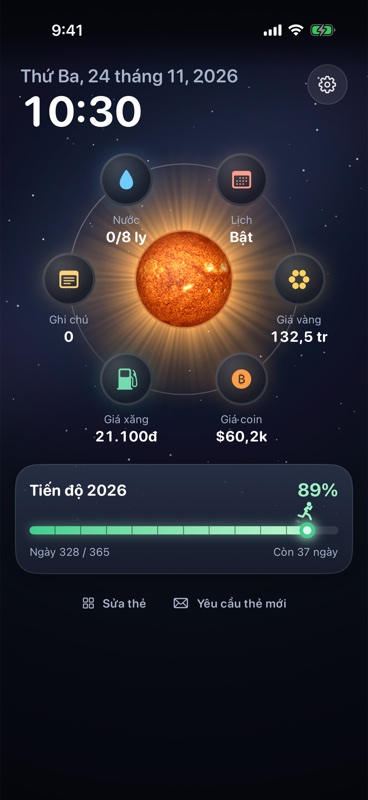
Open Today
Water, tasks, calendar, notes and the items you choose sit around the Sun. At night, the centre of the orbit becomes the Moon at the correct phase.
Tap or hold the Sun
A tap opens five capture buttons: Speak, Camera, Photo, Type and Paste. A hold opens a close-up of the Sun (or the Moon at night), with solar terms and the distance to Earth.
Add the cards you need
Choose year progress, upcoming days, the lunar calendar, weather, battery, gold, crypto or fuel. Swipe calendar events, tasks or notes to delete; details already show in the list.


Simple, complete, beautiful
One screen for the things you usually open several apps to check.
Today’s orbit
Water, sleep, steps, calendar, tasks, notes and any items you turn on sit around the Sun. Swipe sideways to roll the globe; the clock at the top follows.
Capture from the Sun
Tap the Sun to speak, take a photo, pick a picture, type or paste. Tap Calendar, Tasks or Notes to open the list right away.
Calendar, tasks, notes
Events already show their time, place and note. Swipe left to delete, with a confirmation. Tasks and notes stay on your iPhone.
Lunar calendar and moon phase
Full moons, the first of the lunar month, death anniversaries, Tết and solar terms appear on the cards. Sun and Moon images come from NASA; credit is in Settings.
Gold, crypto, fuel
Gold from PNJ (plain PNJ ring or SJC), crypto from Binance (BTC, ETH, BNB, SOL, XRP, DOGE), fuel from Petrolimex. Each card shows its source and update time; the last price stays on the phone offline.
Private
No account, no ads, no tracking. Notes, tasks and water logs stay on your iPhone. Modune has no servers of its own.
Free to use, Pro by the year
The yearly plan includes a 7-day free trial. Cancel before the trial ends and you won’t be charged.
Free
- Calendar, tasks and notes (typing)
- Log water in the app
- Roll the Sun, view the Moon and use the default cards
- See gold, crypto, fuel and weather once those cards are on the screen
- The Request a new card button
Modune Pro Yearly
- Steps, sleep and water connected to Health
- Capture by speaking, camera, photo and paste
- Edit, arrange and resize cards, and choose what’s on the orbit
- Add your own dates to Upcoming
- Restore on another iPhone with the same Apple Account
These are the prices configured on the App Store in Vietnam and the United States. In the app, the price and trial length always come from your App Store and may differ by country. The plan auto-renews until you cancel in Settings › your name › Subscriptions.
Frequently asked questions
Do I need an account?
No. Open the app and start. There’s nothing to sign up for.
Is my data uploaded to a Modune server?
No. Modune has no servers of its own and doesn’t collect your data. Notes, tasks and water logs stay on your iPhone. Calendar and reminders use the Calendar and Reminders apps on your phone. The weather card calls Apple Weather; the price cards call PNJ, Binance or Petrolimex while those cards are on screen. Offline, the last saved price remains visible.
What’s in Modune Pro?
Pro unlocks Health data (steps, sleep, and writing water to Health), capture by speaking, camera, photo and paste, editing and arranging cards, choosing orbit items, and adding dates to Upcoming. Typing, logging water in the app, calendar, tasks, notes and the default cards stay free. The yearly plan auto-renews and includes a 7-day trial if you haven’t used one before.
Where do gold, crypto and fuel prices come from?
Gold from PNJ (plain PNJ 999.9 ring by default; SJC is an option). Crypto from Binance (BTC, ETH, BNB, SOL, XRP, DOGE). Fuel from the Petrolimex price board; you can choose the product and region. Each card shows its source and update time.
What about Pro on a new iPhone?
Go to Modune › Settings › Modune Pro › Restore purchases with the same Apple Account. Cancel in iPhone Settings › your name › Subscriptions, at least 24 hours before renewal. Refunds follow Apple’s policy.